// extensions
The Kompil store and VS Code extensions.
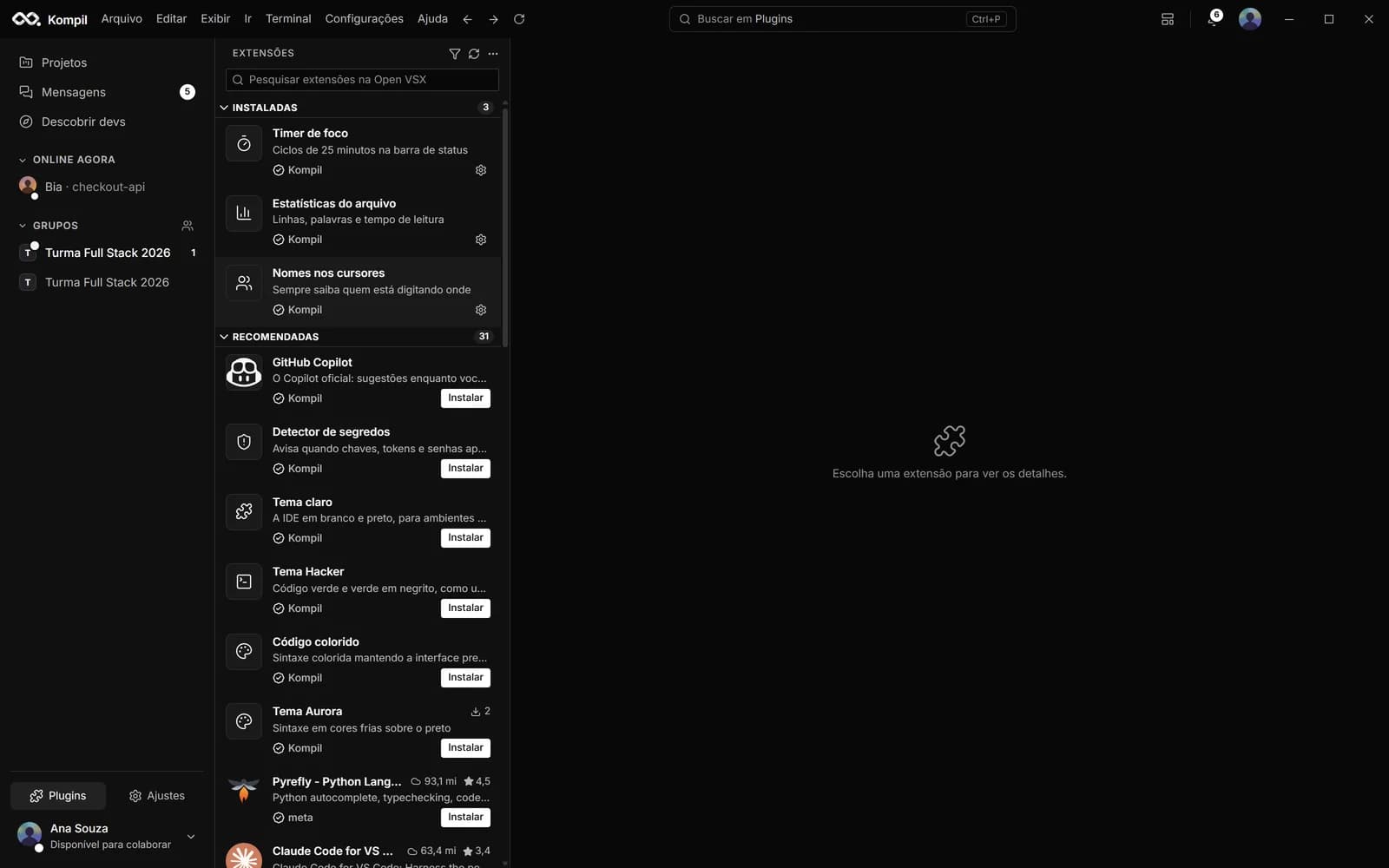
Kompil has its own store, with 34 official extensions, and runs VS Code extensions through its embedded engine, with the Open VSX catalog. The list below comes from the same catalog the app uses.
- official extensions
- 34
- categories
- 8
- with a VS Code equivalent
- 19
// open vsx
VS Code extensions, just like in VS Code
The Extensions screen shows installed, recommended and Open VSX search, with a details page, features and changelog. Install, uninstall, enable, disable and pick another version all run on the embedded VS Code engine. The extensions you already have in VS Code or Cursor on this computer work in Kompil without copying anything.
The catalog is Open VSX: Microsoft's marketplace can only be used by the official VS Code.
Bring what you already use
Under Settings › Import from VS Code (or on the Extensions screen itself), the app reads VS Code, Cursor, VSCodium and Windsurf on this computer — or the link to an exported profile — and brings the equivalents, color themes and snippets to your account. The theme you were using is active right away, on any computer you sign in to.
// 34 extensions
Official catalog
AI3
Claudefeatured
Anthropic's Claude in the corner of the IDE: chat and coding agent
kompil.claude-agent · VS Code: anthropic.claude-code
Quick AI actions
Explain, test, document and fix with a shortcut
kompil.copilot
GitHub Copilotfeatured
The official Copilot: suggestions as you type and Copilot Chat in the corner
kompil.github-copilot
Languages2
Javafeatured
Snippets, run the open class and Java checks
kompil.java · VS Code: redhat.java
Python
Snippets, run the file, pytest and style warnings (PEP 8)
kompil.python · VS Code: ms-python.python
DevOps1
Dockerfeatured
Dockerfile and Compose with best practices and generation
kompil.docker · VS Code: ms-azuretools.vscode-docker
Security1
Secret detectorfeatured
Warns when keys, tokens and passwords show up in the code
kompil.secret-scanner
Editor4
Vim modefeatured
Modal editing with Vim keybindings
kompil.vim · VS Code: vscodevim.vim
Indent guides
Vertical lines at every block level
kompil.indent-guides · VS Code: oderwat.indent-rainbow
Color preview
Swatches next to every #hex and rgb()
kompil.color-preview · VS Code: naumovs.color-highlight
Visible whitespace
Shows spaces, tabs and trailing whitespace
kompil.whitespace · VS Code: shardulm94.trailing-spaces
Appearance13
Folder icons
Folders colored by type, like VS Code icon packs
kompil.file-icons · VS Code: pkief.material-icon-theme
Light themefeatured
The IDE in white and black, for bright rooms
kompil.theme-light
Hacker themefeatured
Green and bold green code, like a movie terminal
kompil.theme-hacker
Colorful codefeatured
Colored syntax while the interface stays black and white
kompil.theme-colorido
Dracula theme
The classic purple, pink and green on a dark background
kompil.theme-dracula · VS Code: dracula-theme.theme-dracula
One Dark theme
The balanced palette made famous by Atom
kompil.theme-one-dark · VS Code: zhuangtongfa.material-theme
GitHub theme
GitHub's code colors, light and dark
kompil.theme-github · VS Code: github.github-vscode-theme
Nord theme
Arctic, cool, low-contrast tones
kompil.theme-nord · VS Code: arcticicestudio.nord-visual-studio-code
Monokai theme
High-contrast pink, lime green and yellow
kompil.theme-monokai
Sidebar color
Give the IDE toolbar your own color
kompil.sidebar-color
Aurora themefeatured
Cool-colored syntax on black
kompil.theme-aurora
Ember theme
Warm-toned, high-contrast syntax
kompil.theme-ember
Rainbow brackets
Each nesting level in its own color
kompil.rainbow-brackets
Productivity8
Live Serverfeatured
Your site on localhost, reloading on every change
kompil.live-server · VS Code: ritwickdey.liveserver
Popular snippets
React, Express, NestJS, Spring, FastAPI, SQL and more
kompil.snippets · VS Code: xabikos.javascriptsnippets
Markdown preview
See the rendered README without leaving the editor
kompil.markdown-preview · VS Code: shd101wyy.markdown-preview-enhanced
Prettierfeatured
Format the file with a shortcut
kompil.prettier · VS Code: esbenp.prettier-vscode
Highlighted TODOs
TODO, FIXME and HACK impossible to miss
kompil.todo-highlighter · VS Code: wayou.vscode-todo-highlight
Zen mode
Just you and the code
kompil.zen-mode
Focus timer
25-minute cycles in the status bar
kompil.focus-timer
File statistics
Lines, words and reading time
kompil.doc-stats
Collaboration2
File authorship
Who changed the file, when and how much, GitLens style
kompil.authorship · VS Code: eamodio.gitlens
Names on cursors
Always know who is typing where
kompil.cursor-names
Kompil extensions that come from VS Code
These official extensions have an Open VSX equivalent: installing the VS Code extension turns the feature on in the Kompil editor.
- Claude ← anthropic.claude-code
- Live Server ← ritwickdey.liveserver
- Docker ← ms-azuretools.vscode-docker
- Java ← redhat.java
- Python ← ms-python.python
- File authorship ← eamodio.gitlens
- Folder icons ← pkief.material-icon-theme
- Popular snippets ← xabikos.javascriptsnippets
- Markdown preview ← shd101wyy.markdown-preview-enhanced
- Dracula theme ← dracula-theme.theme-dracula
- One Dark theme ← zhuangtongfa.material-theme
- GitHub theme ← github.github-vscode-theme
- Nord theme ← arcticicestudio.nord-visual-studio-code
- Prettier ← esbenp.prettier-vscode
- Vim mode ← vscodevim.vim
- Indent guides ← oderwat.indent-rainbow
- Highlighted TODOs ← wayou.vscode-todo-highlight
- Color preview ← naumovs.color-highlight
- Visible whitespace ← shardulm94.trailing-spaces
// free account
Join the orbit.
Creating an account is free. Download the app for Windows or sign in on the web to edit and chat from anywhere.
- Your AI key stays yoursEncrypted in your system's vault, not on the server.
- Works offlineWith the project saved on your machine, everything syncs later.
- VS Code extensionsYour themes, snippets and extensions come with you.
- Updates itselfNew versions download in the background.
Windows 10 and 11 (64-bit) · macOS and Linux coming soon